

This week in my Introduction to Internet Communications things finally started to click. I finally feel like I know what the heck I am doing! We had to edit some our of own photographs in Photoshop and then add them to our website in Dreamweaver. Of course, I am way more familiar with Photoshop, so I finally felt like I was in my zone again.
I used some photos I shot over the last couple of years that I took in my photography class, so that was pretty easy for me to figure out what I wanted to use. The hard part was figuring out what the name of the photo should be and a caption for it! HA! Who know that naming a photograph would be so difficult?!?!? Not this girl, apparently.
Once I edited we had to change the resolution size to 72 pixels and resize the images we learned how to place them on our website page. This is when things started clicking for me. We learned how to create a new HTML page, how to make a grid to place our thumbnail images and text in, and also how to link them to the larger format of the photograph. Up until this point I was so confused and had no idea how all of this fit together.
I did have some trouble, but I DID NOT have to call my son this time! Mostly, my trouble was self-inflicted, because I didn’t change the size of the photograph to make it small enough to be on the computer screen when it was opened, but after fixing that, I finally got it! Here are is a screen shot of my websites gallery page so far.
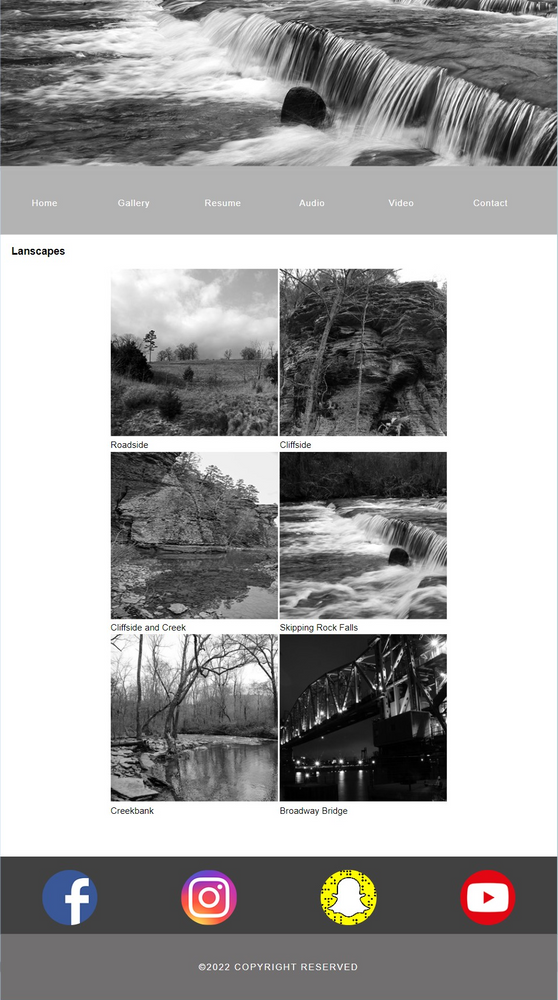
I love how everything is coming together. We, also, created a banner and put social media icons at the bottom of the page. Next week, we are supposed to learn how to edit some design aspects of the site, along with some other components of the page, so I am excited about that. Until then….