

Wow! This week kicked my rear! My husband has been gone all work on a business and it seems like if it can go wrong, it did! However, I am resilient and figured out how to get everything done. This week in Introduction to Internet Communication we had to work with Dreamweaver more and set up a 1 column page for our website to add our resume.
To start, I checked my submission for last week’s assignment where we built our root file and added our personal statement. Somehow, in the process, I messed up my code and in the comments my instructor, Dr. Zeng said that my personal information was there. When I looked at my document in Dreamweaver, I could see it, but when I went to preview the page, it was not. In order for me to be able to move forward, I had to make sure that I corrected this problem. How did I correct it, you ask??? I called my son in Manassas, VA!! Of course, he knew exactly what the problem was within a few minutes! I forgot an opening bracket in my code! This little thing, <, messed up everything! LOL! However, with a couple of clicks, everything was fixed. Whew! That was easy but totally took my breath away, because I had no idea what to do to fix it. He did show me a little trick though.
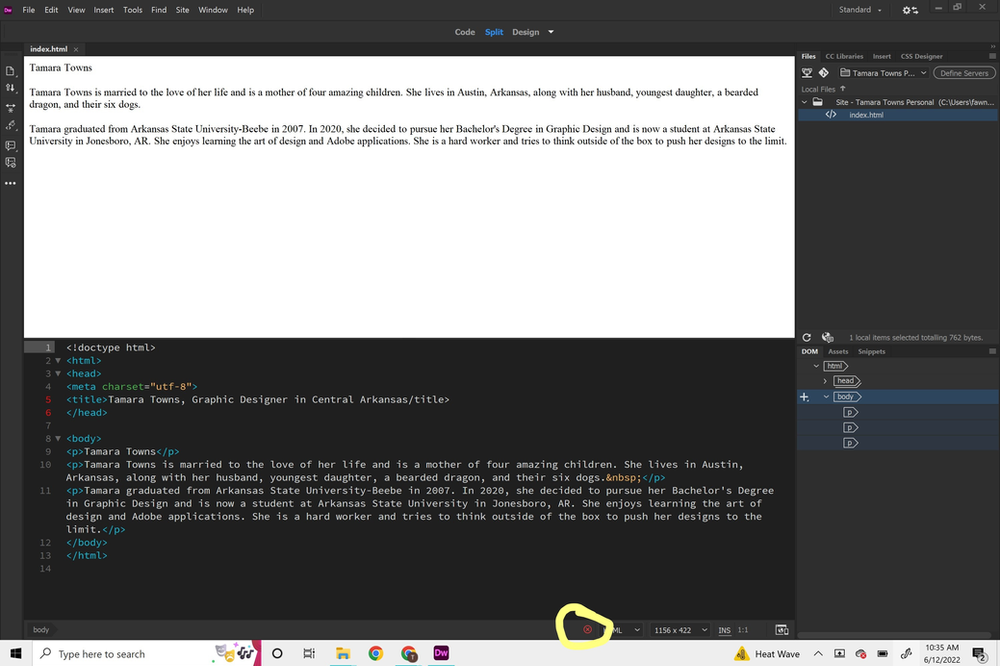
Do you see this little red circle with an X in it? Yep, that is what told him something in my code was wrong. Even though this completely stressed me out, I learned more because of my mistake, so I will take it as a win!!!
Once, I figured out how to fix my code issue, I took the plunge into creating a 1 column page so I could add my resume. The resume is something that I have been putting off for a while, but finally dived in and got it completed and up to date. I watch the video Dr. Zeng made for us and did everything she did. I was so proud of myself, so I went to preview my page. Do you think I had any major issues??? OH, YES, YES I DID!!! It was a silly mistake, but a pretty big lesson!
Let me explain, exactly what I did… When you are working and saving your work to the file on your computer for your website, it is VERY IMPORTANT that you make sure you are working within the correct file in your root folder. So, there I was creating all of these new files, and the whole time I was working with Dr. Zeng’s original file. Did I know this?!?!? NOPE! So, I called my son again. The first question he asked was, “Mom, did you look to see if you had any errors?” Ha! That was the first thing I did! After some looking, we finally figured out that when I was adding my resume it was not updated in the correct file. because, well, I wasn’t clicking on it! Another lesson learned!

Overall, I am very proud of myself and extremely thankful for my son’s help. I hate when things do not work as I planned, but it is just another learning experience. Until next time!